
Contents
- Why is product imagery the biggest bottleneck in e-commerce?
- How do you turn a product photo into an ad creative? (step by step)
- How do you shoot a good input photo? (this decides output quality)
- When is AI enough, and when do you still need a real shoot?
- How do the two compare on cost and speed?
- What are three practical tips for ad performance?
- Real ad variations generated from one product
- Frequently Asked Questions
Short answer: you can upload an ordinary phone photo of your product and have AI apply a professional studio background, lighting and composition — producing several ad-ready variations and matching ad copy in seconds. The Hokus Pokus module inside ADUARDO Mind does this in one click: amateur photo in, 12 professional variations plus Meta ad copy out. No studio rental, no waiting on a photographer, live the same day.
This guide walks through the workflow step by step, shows how to shoot an input photo that actually produces good output, and is honest about the cases where AI is not enough and a real shoot is still the right call.
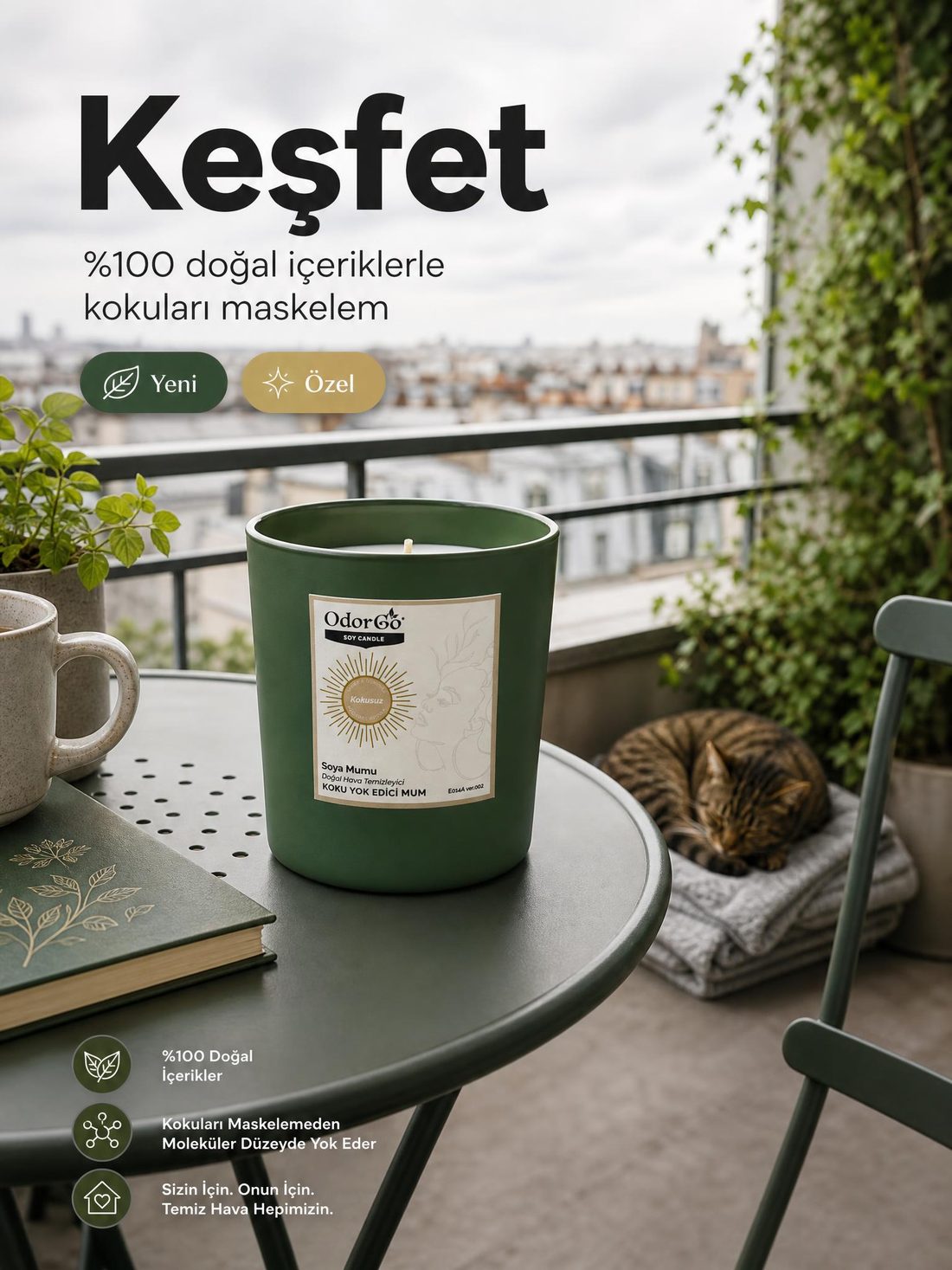
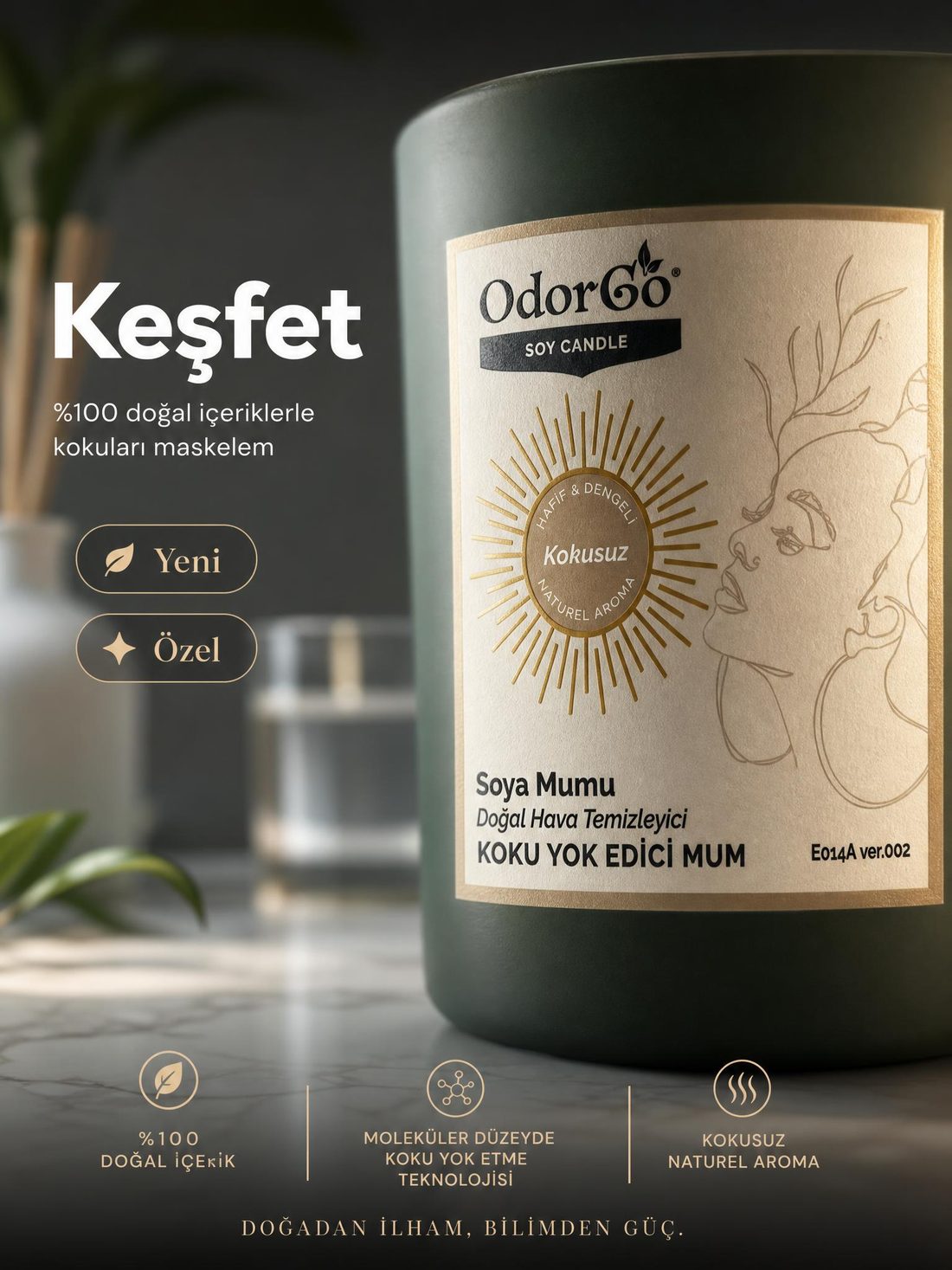
Note: every image in this article is a real Hokus Pokus output — different ad variations generated from one photo of the same soy candle. The kitchen, studio, nursery and balcony scenes you see below are not stock photos; they are AI-generated variations of the same product.
Why is product imagery the biggest bottleneck in e-commerce?
Because ad creative is not a one-off deliverable but a continuous production need: every new product, campaign and test consumes fresh creative.
A professional product shoot is expensive, but the bigger problem is that it is slow: brief, booking, shoot, selection, retouching — days. Performance marketing, meanwhile, runs on variation; you cannot test an ad campaign with a single image. The load compounds with every additional SKU, and in most small teams the result is one of two failures: the ad creatives go stale, or the brand ships phone snapshots that do not match its own positioning.
The real issue is not "a beautiful photo". It is producing on-brand imagery at a sustainable tempo. The bottleneck is rhythm, not talent: your ad account consumes creative faster than manual production can supply it.
How do you turn a product photo into an ad creative? (step by step)
Five steps: shoot a clean input photo, upload it, apply your brand style, generate the variations, then publish with the generated ad copy.
The process does not require learning a design tool. Taking a decent photo of the product and following the order below is enough:
- Shoot a clean input photo. Plain, uncluttered background, natural light, no harsh shadows, sharp focus.
- Upload the photo. In ADUARDO Mind, drop the product photo into the Hokus Pokus module.
- Apply your brand style. Because the system already knows your brand identity (Brand DNA), the output is not generic — colour, tone and style stay consistent with your brand.
- Generate the variations. In seconds you get 12 professional variations across different backgrounds, lighting setups and compositions — a creative pool ready for A/B testing.
- Publish with the ad copy. Use the Meta ad copy generated alongside the visual, and send it straight to ads management or to your content calendar.
How do you shoot a good input photo? (this decides output quality)
The rule is simple: plain background, plenty of soft light, sharp focus, and the whole product inside the frame.
The single biggest factor in AI output quality is the input photo you provide. Expensive gear is not required; a phone camera is more than enough when the rules below are respected.
- Background: flat and single-coloured (white or grey paper, a plain table). Patterned surfaces make it harder for the AI to separate the product.
- Light: daytime, near a window, indirect. Avoid hard shadows and warm bulb light.
- Focus: tap the product to lock focus; a blurry input gives a blurry output.
- Framing: keep the whole product visible, do not crop the edges, leave a little breathing room.
- Angles: shoot 2-3 different angles so you can test which one performs in ads.
- Cleanliness: dust, fingerprints and label residue show up in the output too.

When is AI enough, and when do you still need a real shoot?
For standard products, background and scene variation, and fast testing, AI is more than enough; transparent or highly reflective surfaces, human models, motion and complex material textures still call for a real shoot.
AI does not replace the photographer; it takes over the repetitive, high-volume part. An annual brand shoot is still valuable — you simply no longer need to reshoot for every campaign.
| Situation | Recommended |
|---|---|
| Standard product (boxed, packaged, textile, accessory) | AI |
| Background or scene variation, fast A/B testing | AI |
| Plenty of creative for a seasonal campaign | AI |
| Transparent glass, high gloss, complex texture | Real shoot (or AI plus retouching) |
| Human model, product worn or held | Real shoot |
| Motion, video, moment-of-use footage | Real shoot |

How do the two compare on cost and speed?
The difference is tempo more than price: shoots are billed per product or set and take days, while AI generation sits inside a flat monthly subscription and takes minutes.
Comparing the two purely on invoice size is misleading; the real gap shows up in production tempo and scalability. With a professional shoot, every new product and every extra variation is a new cost. With AI generation, you can regenerate as often as you like inside the same subscription.
Last updated: July 2026 — ADUARDO Mind plans start at $399 per month; the full tier list is on the pricing page. Prices are shown in USD and billed in TRY via iyzico.
| Criterion | Professional shoot | AI (Hokus Pokus) |
|---|---|---|
| Cost model | Per product or set; compounds with SKU count | Flat monthly subscription (from $399/month; billed in TRY via iyzico) |
| Time | Days (brief, shoot, retouching) | Minutes |
| Variations | Extra shoot equals extra cost | 12 variations in a single run |
| Brand consistency | Depends on the photographer and the brief | Systematic, driven by Brand DNA |
| Flexibility | Requires a reshoot | Regenerate instantly |
What are three practical tips for ad performance?
You do not test an ad with a single image; producing variations and finding the winner is the actual job.
Being able to produce plenty of creative is not just convenient, it is a direct performance advantage: the more variations the platform algorithm can test, the faster it finds the winning creative.
For e-commerce teams specifically, the creative pipeline is usually the constraint on scaling ad spend — see how the same workflow fits a full store operation on our e-commerce page.
Accuracy is part of performance, not only aesthetics. In Salsify’s 2025 consumer research (1,910 shoppers in the US and UK), 84% of shoppers rated price and availability, and 77% rated product titles and descriptions, as very or extremely important to their purchase decision — and 71% said they had returned an item because the description was inaccurate. That study measured product content rather than product imagery, but the discipline transfers directly: a generated scene that promises something the delivered product does not have buys a click and loses the customer.
- Test with variations: the same product on a different background or composition can produce a clear performance gap. More creative means faster learning.
- Keep visual and copy aligned: when the promise in the image contradicts the promise in the text, conversion drops.
- Refresh tired creative: running the same image for a long time degrades performance (creative fatigue), and refreshing is easy when production is cheap.
We treat the product photo as the source of truth, not as inspiration — if a generated scene flatters something the customer will not actually receive, we have built the wrong tool.
Real ad variations generated from one product
Every image below was generated with Hokus Pokus from a single photo of the same soy candle — different backgrounds, lighting, scenes and ad copy. This is what a creative pool ready for A/B testing looks like.




Frequently Asked Questions
Is a phone photo good enough?
Yes — with a plain background, decent light and sharp focus it is enough; input quality is the biggest factor in output quality. Expensive gear is not required.
How many variations are generated?
Hokus Pokus produces 12 professional variations from a single upload, which gives you a creative pool ready for A/B testing.
Is ad copy generated too?
Yes, Meta ad copy is generated alongside the visual and can be sent straight to ads management or to your content calendar.
Does this remove the need for real photography entirely?
No — transparent or glossy surfaces, human models, motion and complex textures still give better results from a real shoot. AI takes over the repetitive, high-volume production; it does not replace the photographer outright.
Will the visuals match my brand?
The system learns your brand identity through Brand DNA, so the output is brand-consistent rather than generic; colour, tone and style stay faithful to your brand.
Is this the same as using Canva?
No — in Canva you design the visual manually; here AI generates it against your brand identity. For a detailed breakdown see Canva alternatives, or read the wider AI marketing guide for how this fits the rest of the stack.